AURSINC
AURSINC SDR Radioberry HF SDR Transceiver Pi Hat for Raspberry Pi 4, Radio Card (RPi 4 Hat) Analog Devices AD9866 & 10CL025 12-bit Broadband Modem for Ham Radio SDR Transceiver
AURSINC SDR Radioberry HF SDR Transceiver Pi Hat for Raspberry Pi 4, Radio Card (RPi 4 Hat) Analog Devices AD9866 & 10CL025 12-bit Broadband Modem for Ham Radio SDR Transceiver
Couldn't load pickup availability
- Turn your Raspberry Pi to SDR Transceiver. Many amateurs have done a lot with Raspberry Pi ranging from cat control to converting it to a full fledged SDR transceiver. The latest kid in the block of SDR Transceivers is Radioberry. It’s a combination of Raspberry Pi with a radio board developed using AD9866 12-bit microcontroller
- Radioberry board actuall directly connects with the Raspberry Main Board. This braodband model mixed signal front end has been actually remodeled as a direct down and up conversion SDR Transceiver covering the entire HF spectrum (0-30 Mhz)
- The radio card uses an Intell Cyclone 10LP FPGA, supporting the 10CL25 The firmware will be loaded via the raspberry pi. Power supply for the radio card is provided by the raspberry pi. The maximum receiving bandwidth is 384khz, supporting A and B dual receiving modes, and the output power is up to 10dbm
- Packing List: Radioberry v2.0 x1, Heat dissipation fan x1. If you encounter any issues or have questions, please feel free to reach out to us at any time. We are here to assist you. (The new black radioberry version compatible with radioberry juice usb board and radioberry preamp board)
The project is in a 'Perpetual beta' stage. For more information look into:
https://en.wikipedia.org/wiki/Perpetual_beta
For more DETAILED information look into:
https://github.com/pa3gsb/Radioberry-2.x/wiki#radioberry
Groups:
https://groups.google.com/g/radioberry
Driver for radioberry (download and refresh to card)
https://groups.google.com/g/radioberry/c/Mf2VZZU6ltA
Now, a 025 mirror system is provided, which can run the SDR client directly with pihpsdr on the desktop, and the win/linux/mac client that supports SparkSDR supports the gateway working mode, and supports the expansion of the PA 5W V2 power amplifier to work in 3W mode, which can directly push the power amplifier above 100W.
Connect Radioberry025 to Raspberry Pi 4/4B, then run the image file provided by Raspberry Pi 4 (Raspberry Pi 4B has a ready-to-use image, no settings required).
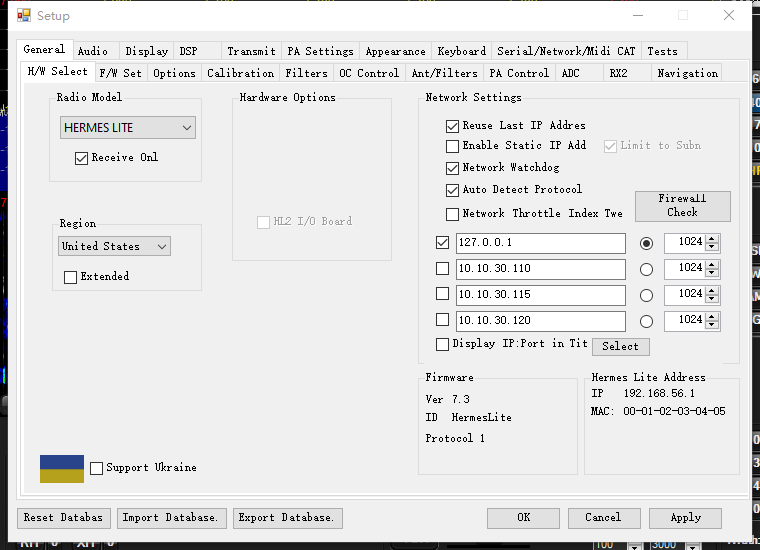
Connect to the network cable and power supply of 5V and 2A, and you can start transmitting and receiving. It can be connected to a screen for use or not. Please refer to the picture for software configuration. Just fill in the IP of the Raspberry Pi and it can be used.

Download:
https://drive.google.com/file/d/1RzKAeha6EW8e4WeDlxpYBMPwdu-GsVZJ/view?usp=drive_link